Documentation
Security
How model keys and MCP credentials stay with Bento, and what a sandbox can reach.
Agents read untrusted input (issues, READMEs, web pages, tool output), so Bento assumes any agent can be prompt injected. The sandbox is the boundary: an agent can run any command and read anything in its sandbox. What Bento controls is what the sandbox contains and what it can reach.
Model keys stay encrypted in Bento
On hosted Bento (app.usebento.ai), a sandbox never contains your personal API keys or your team's shared keys for supported providers. It contains a proxy token instead: a token minted for one agent session, under the same variable name as the key it replaces (ANTHROPIC_API_KEY, OPENAI_API_KEY and so on). The tool's base URL variable points at Bento's model proxy, so the agent sends its model calls to Bento with the proxy token, and Bento sends them on to the provider with the real key.
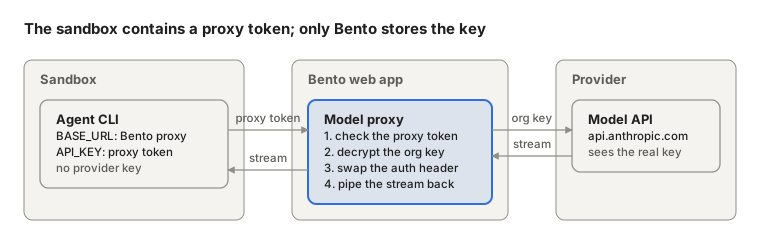
- Bento mints a proxy token when the agent session starts, and keeps only its hash.
- The agent calls Bento's model proxy with the proxy token, in whichever header its tool sends a key in.
- The proxy checks the token, decrypts the selected personal or shared key, swaps it in, and streams the request and the provider's answer through unchanged.
- The proxy token stops working as soon as its agent session ends, however it ends.
A proxy token can do much less than a key:
| Model API key | Proxy token | |
|---|---|---|
| Lifetime | Until someone rotates it | The agent session |
| Endpoints | The provider's whole API | Completions, token counting and model listings |
| Where it works | Anywhere | Only through Bento's proxy |
| If an agent prints it | The key is gone | Useless once the agent session ends |
A request for anything else in the provider's API (files, fine tuning, batches, account and admin endpoints) is refused.
Model providers' addresses come from Bento's list, not from the sandbox, so an agent cannot point the proxy, or your key, anywhere else.
A few setups still put a credential in the sandbox:
- harnesses with no base URL to point at Bento (Cursor, fx, Muse Code)
- custom provider keys and Ollama
- a saved base URL that is plain
httpor a private address - legacy local machine login sharing, including a Claude subscription login; personal account connections use the proxy in local and hosted Bento
The agents guide in the Bento repository lists which keys each tool sends through the proxy.
Bento in local mode (the Mac app, or bento on your own machine) uses the model proxy too, by default, with the Docker sandbox: the agent gets a proxy token, and Bento on your machine adds your key, from its environment or from keys saved with bento setup. Turn it off in the Mac app under Advanced settings, Model proxy, or with BENTO_MODEL_PROXY=false for the terminal and the web UI. Either change takes effect when Bento next starts; in the Mac app, changing it while Bento runs turns Start into Restart to save these settings, which restarts it at once. A team server you host yourself always uses the model proxy, like app.usebento.ai.
- With Local process there is no sandbox and no proxy: the agent runs as you and gets your keys.
- If the sandbox cannot reach Bento, that agent session keeps its keys, and its transcript says so.
- A saved base URL that names your own machine (
localhost,host.docker.internal) means something else inside the container, so that key reaches the sandbox with it.
Personal and shared API keys
New model API keys are personal by default. Only owners and admins can turn on Shared organization key before saving; otherwise the field is labeled Personal API key. Existing shared keys keep their scope. Personal keys are encrypted and kept apart by user, including from the team's owners and admins. Owners and admins still define custom providers, and each member can save their own key for one.
Stage runs and stage follow ups you start use your personal keys before shared keys. A personal key never uses the team's base URL. Teammates cannot steer a run that uses someone else's personal key. Background stages, judges, conflict resolution, swarms, and remote runners keep using shared or machine keys. The GitHub connection stays shared.
The proxy checks the person's team membership and the run's personal key on every request. Removing the key or leaving the team blocks later requests, and the run never falls back to a shared key. Saving a deleted key again does not revive an old run; start a new one. Replacing an existing key's value rotates it for later proxied requests. Removing a key cannot take back a value already handed to an agent through a tool the proxy does not cover.
See Personal and shared API keys for setup. Personal subscription connections stay individual and cannot be shared with a team.
MCP credentials stay with Bento
MCP servers go through Bento's MCP gateway, the model proxy's counterpart for tools: the agent's MCP config points every server, Bento's own tools and the team's and members' servers alike, at the gateway, with the agent session's proxy token. The gateway checks the token, attaches the server's credential, and calls the server from Bento's side. The sandbox never stores an MCP credential, and a server disabled mid run is refused on its next call. See the MCP guide in the Bento repository.
Git access
On hosted Bento, git uses short lived GitHub App installation tokens, each scoped to one of the project's repositories, never the host's SSH keys or git config. See GitHub connection.
What a sandbox can reach
By default, the open internet, so agents can install packages and read docs.
An owner or admin can block it in Settings, Team. A blocked team's runs go to Modal, which allows only:
- Bento's own address, where the model proxy and the MCP gateway live
- the project's git remotes
- the hosts of model keys that are not proxied
- the team's Allowed sites (each team MCP server's host is added when it is enabled, and can be removed)
A blocked Modal run still attaches MCP servers, through the gateway.
Docker deployments. With the block on, Docker sandboxes use a restricted network the operator creates, and Bento does not manage its rules. That network must let sandboxes reach Bento's own address, because model calls go through the proxy there. Without that route, every blocked run fails at its first model call. The Allowed sites list does not apply to Docker, and blocked Docker runs attach no MCP servers. Setup: network lock on Docker.
Billing when Bento fails
A run is billed unless Bento or its sandbox failed it. If the proxy itself fails a request (it cannot read or decrypt the key, or its own code fails) and the run then fails, the run is not billed. Once the provider answers a later request, the run is billed as usual. A provider that is down or slow is the provider's failure, as it is without the proxy.
Good practice
- Never expose the host Docker socket, host SSH keys, or host git config to a sandbox.
- Prefer proxied API keys or personal account connections over legacy local machine login sharing, so provider credentials stay outside the sandbox.
- Keep a saved provider base URL on public
https, so the key can go through the proxy.